

Decoupling a website means separating two things a classic site mixes together: the interface your visitors see, and the tool where you manage your content and data. Long reserved for very high-traffic sites, the approach is now common. Headless, Jamstack, static site: these words describe variations of the same idea. Here is what they mean, what you gain, and when it is not the right choice.
What does decoupling mean?
Take a classic WordPress site. The same software does everything: it stores content in a database, applies the theme, builds each page when a visitor asks for it, and runs the admin interface. This is a monolithic architecture: the front-end, what the visitor sees, and the back-end, what manages the data, form a single block.
A decoupled site splits these into two independent applications:
- the back-end stores the content and exposes it through an API;
- the front-end fetches that content and builds the pages.
When the back-end is a CMS with no “head”, meaning no theme or pages of its own, it is called a headless CMS. Sanity, Directus, Strapi, or WordPress used only through its API, play that role.
And the Jamstack?
The Jamstack takes decoupling one step further: pages are generated in advance, at publication time, rather than on every visit. The site queries the content source once, builds all its pages, then serves them as they are from a content delivery network (CDN).
It makes sense: the page presenting your services is the same for every visitor, whether loaded from Paris or Tokyo. There is no need to rebuild it every time.
People often say “static site”, with big quotation marks. Nothing is frozen: content updates from the CMS, and dynamic parts (forms, customer area, search) remain possible. Current frameworks such as Next.js or Astro combine both, page by page: pre-generated pages for the showcase, dynamic pages for what depends on the user.
What you gain
A much faster site
Serving a page that is already built, with no database query, is much faster. In a measurement we made on the same site (same text, same images, same look), the decoupled, pre-generated version loaded twice as fast as the WordPress version, with a home page seven times lighter.
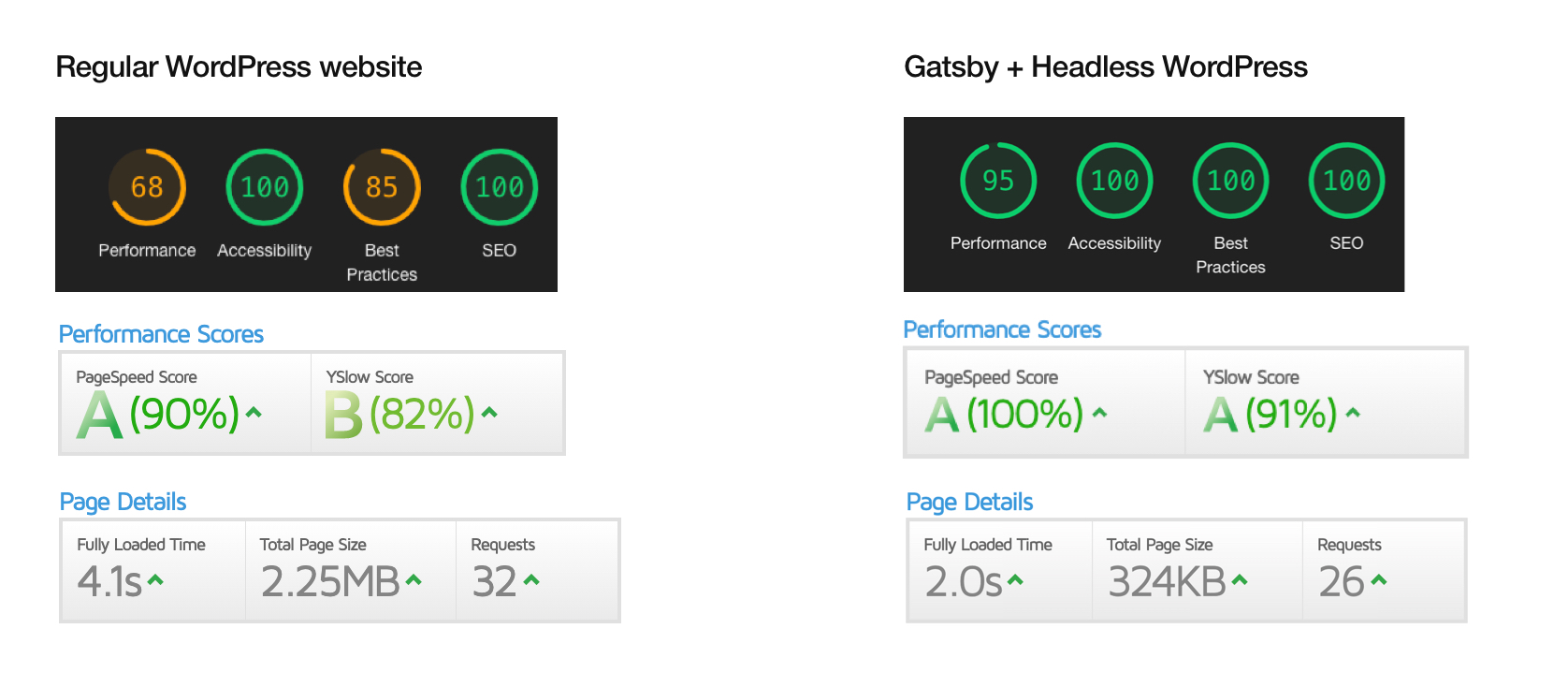
On mobile, the difference is felt immediately, and it matters for search: for equal content, Google favours fast pages.
A smaller attack surface
Many hacks go through the database or through files modified on the server. A pre-generated site does not talk to a database on every visit, and its files are served from a CDN. That is one less way in.
Traffic spikes absorbed
When traffic surges, a classic site can go down because its database is overloaded. Pre-generated pages handle the load without breaking a sweat.
A free front-end and easier redesigns
With front and back independent, each can use the best-suited technology, for example React or Next.js for the interface. Above all, when you redesign, you only touch the front: content stays where it is, with no migration.
Several channels fed by one source
The same back-end can feed the website, a mobile app, an intranet, in-store screens. Content is entered once, in one place, then published wherever it is needed.
Fewer resources consumed
Fewer server requests means less energy per visit. A decoupled, pre-generated site supports eco-design.
The limits to know
Decoupling is not always the answer:
- Two applications to maintain instead of one: the initial project is more technical and requires front-end skills.
- Less all-in-one. WordPress plugins that added a feature in one click no longer apply to the front: each feature is built or connected.
- Content preview before publishing must be planned from the start, or editors publish blind.
- For a small showcase site that is rarely updated, a well-maintained classic site is often the simplest choice.
The approach pays off when speed, security or flexibility really matter: a high-traffic site, content published on several channels, a site that changes often, or a site connected to a business application.
How to switch without rebuilding everything
Good news: you can keep your current tool. WordPress has a built-in API, so you can keep the editing interface your teams know and rebuild only the front. You can also move to a headless CMS designed for it, such as Sanity, if your current back office has become a bottleneck.
The typical approach:
- Model the content: page types, fields, relations, languages.
- Connect the content source: your current CMS’s API, or a new headless CMS.
- Build the front, choosing page by page what is pre-generated and what stays dynamic.
- Plan preview and automatic republishing whenever content changes.
Wondering whether to decouple your site, or whether your current CMS can serve as a back-end? The first scoping is free: describe your site and its constraints, and we will tell you whether the approach makes sense for you.